Categories
Uncategorized

Love Clean Streets

I hate seeing (bad) graffiti or fly tipping anywhere, but especially around our own neighbourhood. I keep thinking I should get the council to do something about it with all that council tax I pay, but it has always seemed a bit too much of a hassle to get around to doing it.

Now there’s an easy way to let councils know, and that’s via an organisation called “Love Clean Streets”. They provide an iPhone app and a Windows Marketplace app of the same name. The app will prompt you to take a picture and enter some brief text about the issue. It will then tag it with your account (Twitter/Facebook/Windows Live/etc.) and the GPS co-ordinates from your phone.

The result is a public online database of environmental issues filed by local authority and ward. Some councils have signed up to provide updates on issues and let the site know when they have been rectified. Those councils that don’t currently do so, like mine (Merton), may soon bow to pressure once the database builds up.
Categories
Computers and Internet

Solid State Hard Drives

Over the years I’ve built up a few PCs by researching and buying components then stitching them all together. I always strived for the highest performing computer I could buy without breaking the bank. Recently I discovered that the single best way of increasing my computers’ performance by changing a single component is by replacing the hard drives with solid state drives (SSD).

Solid state drives are essentially some kind of random access memory packaged into a box with hard drive data and power connections that can be used anywhere a normal hard drive could be used. There are a several different types of SSD drives, but the most common are the 2.5” Flash Memory based drives. The 2.5” means that they’re designed to fit in the standard space inside a laptop. The “flash” bit means that they retain their data even when there’s no power, as per a flash USB memory stick. There are other, faster, versions based on DRAM that require an on-board battery or a constant external power supply to retain data.

I upgraded my home PC with a Samsung 256 GB drive and my work laptop with an Intel X25-M 160 GB drive. These are both 2.5”. In order to install the Samsung drive in my home PC I needed to purchase a caddy, such as this Akasa Dual 2.5” mounting kit. It just pads out the space so that you can mount the drive in a standard PC 3.5” drive bay.

The capacity of the drives at the moment isn’t comparable to that of traditional drives (with 2 TB drives currently available for £135), so at home I keep all my photos, videos and music on traditional hard drives (2 x 400 GB, using RAID 1 to offer some level of data safety) and leave the SSD ones for applications.

If you follow the links to those drives on the Overclockers site, you’ll see that they’re not that cheap. However, the speed increase I’ve achieved on both systems is excellent. Application start up time is a fraction of what it used to be on the same machines. Search performance is noticeably faster in both Outlook and Windows in general. The whole system seems somewhat snappier. I had been thinking about building another PC from scratch with a faster CPU and more memory, but having made the SSD upgrade I doubt I’ll bother for another year or so.

It’s worth noting that if you’re upgrading to an SSD you’ll probably be wanting to install your operating system on that drive too. It’s a good time to upgrade to Windows 7, which is what I did. Great OS.

Thanks to Avanade UK’s “gadget allowance” for funding these purchases!

Technorati Tags: ,

Categories
Personal

Arthur Bond

By popular request, here are a couple of pictures of Arthur, for a change! It’s been six weeks since the operation on his upper lip, and it’s healing well. You can still see the scars, and they could be there for up to a year. However, there’s already a large improvement. The next major operation is to give him a haircut. We will get around to that, I promise. (Arthur, if you’re reading this in several years time, I apologise for the length of your fringe!) 

In other news he has his first tooth in the unusual position (I am reliably informed) of the top left. He’s being quite brave about it all, but it’s obviously not the most fun a baby can have! Poor chap.

Categories
Personal

Arthur’s Lip Surgery Complete

Arthur’s lip surgery is complete and went well. He was released from hospital the day after the operation and a very tired family were quite happy to get home at about 7pm on Friday. He’s recovering well with more smiles than tears, but still on pain relief. I’ll post up a post-op picture once his lip has settled down a bit. Thanks to everyone for their well-wishes, they were very much appreciated.
Categories
Personal

Arthur’s Surgery Tomorrow

A quick update – Arthur’s second surgery has been retimed back to its original date of tomorrow, September 17th. He went for the pre-admission clinic today and passed all the tests (which are: Do you have a cold? Are you allergic to anything?) so we’ll be heading in early doors tomorrow. The operation will occur in the morning. He might be out on Friday if all goes swimmingly, but they did keep him in an extra night last time so we’ll just have to see.
 
Thanks to all who have sent us good wishes. I’ll let you know how it went.
Categories
Uncategorized

Arthur At Six Months

It’s late August and Arthur’s six months old, eating messy ‘solids’ and has had one lot of surgery on his lip. He’s doing well, putting on a quarter of a kilo last week. Let’s hope that rate of growth slows somewhat, eventually! He’s pictured on the right here with Lion, a genuine native Namibian, who chose to travel back to the UK with Arthur’s Grandpa Dave (Julie’s dad). On the left, below, he’s being bewildered by my brother Nathan on his cousin Florence’s play mat.

As I mentioned, Arthur has had one operation so far. This was to ‘pin’ the sides of his lips up to the middle part of his lip, and to start pulling that middle part back a little. It is preparatory surgery for his second operation, which has recently been retimed to mid October. The second operation will be more of a cosmetic one with the aim of connecting the lip muscles rather than just the skin. Once everything has calmed down, this should go some way towards looking like a ‘normal’ lip.

Further operations will be required to close the gap in his palate and possibly to pull back the gum and bone that sit behind the middle lip. The former should take place near his first birthday, as this will be necessary for speech development.  The latter will probably happen just before school age, so I reckon he’ll be a bit goofy with his milk teeth until then!

All of this is being done on the NHS, whose South Thames Cleft Services have given us some excellent support. In other countries kids aren’t quite so lucky. You’ve probably seen the adverts for SmileTrain, a charity facilitating cleft repairs for those in countries without the facilities we get from the NHS.

Anyway, tonight sees him move out of our room and into his own bedroom, into the cot bed that could be his bed for the next four and a half years! Hopefully he’ll take to it well. We’ll see!

Categories
Personal

Arthur Update

A quick update on Arthur. He’s been home now for just over a week and isn’t requiring a tube to feed, which is good news. He’s gaining weight as expected. We’re now dealing with the normal new born parents’ problem of trying to get enough sleep!
 
We have an appointment on Monday with the team of people who will be performing lip and palate surgery, orthodontal work, speech and language therapy and hearing corrections. They’ll lay out the timetable for the work on him and we’ll ask questions. I’m going to try and record the meeting on my phone, as the first thing that disappears with sleep deprivation is memory!
 
After the meeting it’s back to work for me after three weeks off. I’ll leave you with a picture of him in his Moses basket at home, eyes open and no feeding tube in sight.
 
By the way, thanks everyone for the cards, calls and presents. It means a lot. Thank you cards will be on their way out just as soon as we can teach him to write.
 
Categories
Personal

Arthur

Meet Arthur Albert Gallagher, my son. Born two and a half days ago. He’s had limited exposure to the world so far as he has been kept in the neo natal ward to sort out his feeding.

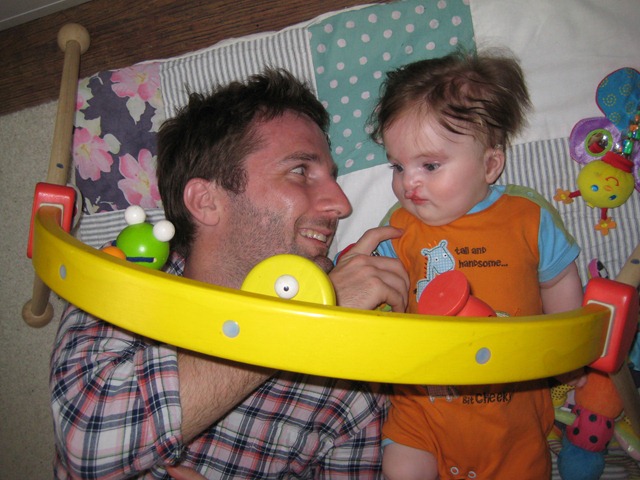
During Julie’s pregnancy he was diagnosed with a cleft lip and palate. Have a look at www.clapa.com, the Cleft Lip & Palate association, for some great material about the condition (for instance, “one in every 600-700 children in the UK is born with a cleft lip and / or palate”). In Arthur’s case the cleft is bilateral and so the middle part of his upper lip is not pulled into position by the rest of the lip. This is the protrusion under his nose (see the picture below and right). They’ll operate on this when he’s about 3 months old to pull it into position. See these photos for examples of the results.

As you can see, he has a feeding tube taped into position. He can’t form suction due to his cleft palate: There’s no way of creating an air tight seal with a bottle or breast. Usually the tube would go up through the nose, but the combination of cleft lip and palate mean that there’s no separation between nasal passage and the mouth.

The feeding tube is a little irritating for him, and not an ideal feeding mechanism for new parents with no medical background (though it’s not rocket science either). So we’re trying to teach him to use his automatic sucking reaction in combination with us squeezing a bottle of milk to simulate what would happen if his sucking were effective. It seems that getting him feeding more naturally like this is good for his development. And the transition seems to be going well so far!

But enough of the cleft. He’s a much loved little boy with blonde highlights in his hair, an inquisitive gaze (when he’s awake) and of a good weight (8lb 8oz / 3.85kg). He’s brought a lot of joy to Julie and I and to all the grand parents, for whom he’s the first grandchild (by a few months at least).

The main point of this post was to show a couple of photos for those who had been asking. However, as I hadn’t previously mentioned the cleft to everyone I wanted the photos to appear in the context of an explanation. I hope it has interested you a little.

Categories
Computers and Internet

DeskSpace

I’m trying out an application to provide multiple desktops on my PC with a 3D cube effect for navigating between them. It’s called DeskSpace and was introduced to me by Ben Taylor. Have a look at it in action.
It provides six virtual desktops, one for each side of the cube. A short cut key (for me, Windows+Alt) zooms out to see the cube view whereupon the arrow keys or mouse wheel can be used to rotate the cube. Translucency helps you work out which way to rotate to access your applications. You can also ‘throw’ applications through the edge of one desktop to move them over to another, or quickly navigate to a particular application via a system tray icon.

It’s not a new application. It’s been around for a couple of years, in fact, and possibly as a result it seems quite stable. It works with XP and Vista (plus Vista x64).

Ben and I were talking through how it works. It seems to freeze each desktop into a bitmap image at the point you switch desktops, so updates to another desktop are not visible in the cube (unlike Vista’s card deck Windows-Alt feature). There is also occasional task bar application shuffling when shifting to a new desktop, indicating that it might be selectively hiding applications rather than maintaining multiple desktops in the fashion of multi-monitor desktop extensions.

Not sure how much of a memory hog it is – 4GB of memory sort out most issues – but it is reporting a working set of 150MB (not 150K as I previously stated!)

There’s a 30 day trial and then the per-person (yet multi-machine) licence is currently $24.95 US.

Technorati Tags: ,
Categories
Computers and Internet

Google Latitude Background Updates

I’ve installed Google Latitude on my HTC Touch HD, which came packaged as a new version of Google Maps, and can now see myself labeled on the map. Hoorah. Now all I need are a view friends with it installed.

One issue I can see, though, is that it does not seem to be updating my location in the background, if the blue dot on the map is anything to go by. I have to make Google Maps the foreground application for it to re-determine my location. Maybe the Android version works better.

Technorati Tags: ,